Image Lantern

Every shoot, card to client.

Ingest, cull, edit and deliver in one blazingly fast Mac app. Built for photographers who shoot in volume.

Download free trial

Try it free for 21 days. No credit card required.

Less AI.
More craft.

See every frame. Make every call.

Tools you actually need. No AI gimmicks. Nothing decides for you.

Ingest

Two verified copies before you touch a frame.

Each card is read once and written to your working drive and your backup at the same time. Every file is then checked against its checksum, read back from the disk itself.

  • 461 MB/s from a USB card reader, verification on2
  • A copy that gets interrupted picks up where it stopped
  • Rename, caption and copyright as the photos come in
One read, every destination. Cards on the left, drives on the right, a line for every copy.
See the space before you start. What this ingest needs, and what will be left.
Contact Sheet

Every frame, at the speed of your keys.

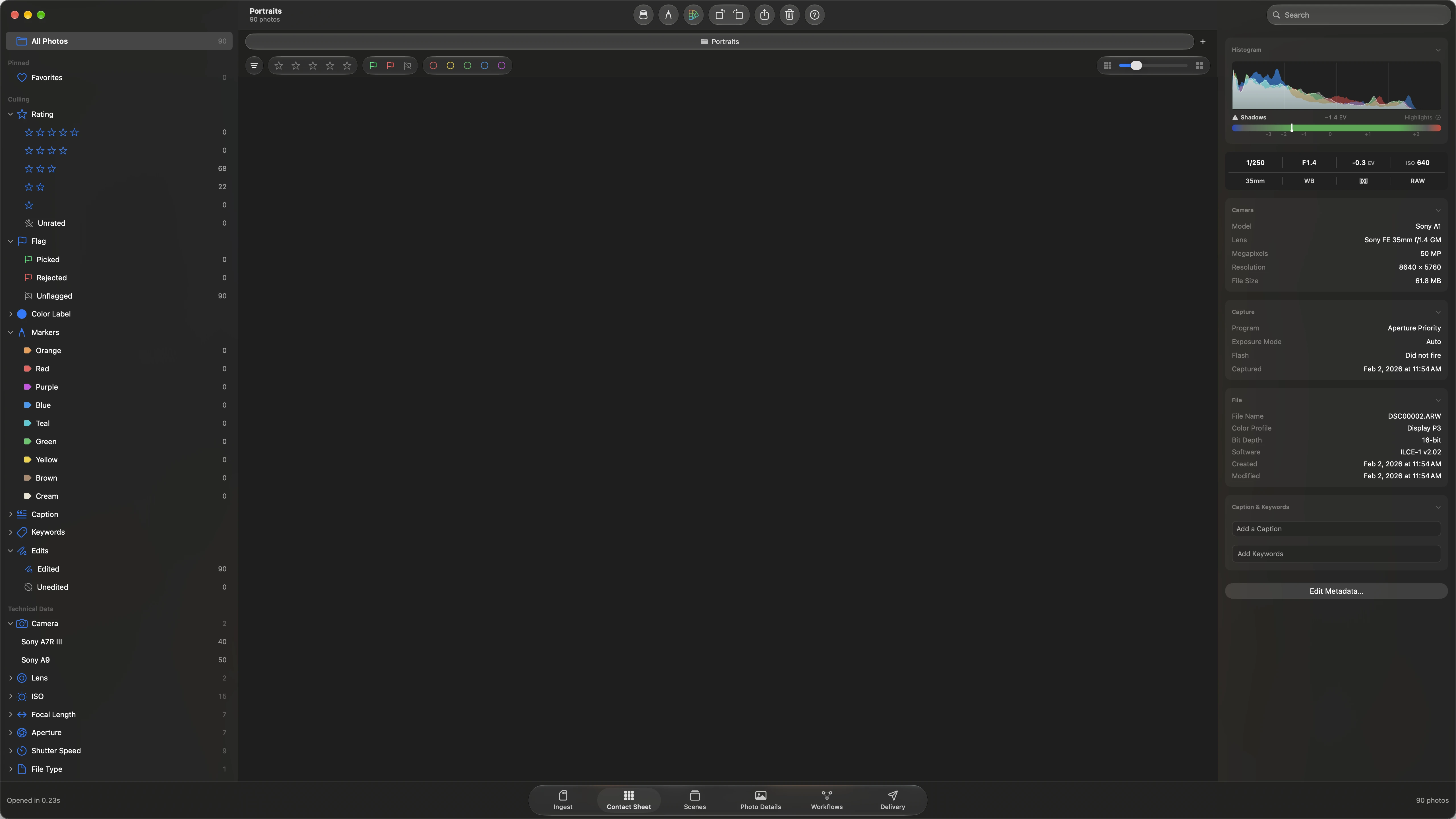
Open a folder and it is on screen: 12,422 photos ready to cull in 1.3 seconds,1 with no import and no catalog to build. Stars, flags and color labels sit on the keys your hands already know.

  • 1 to 5 for stars, P to pick, X to reject, 6 to 9 for labels
  • The sidebar counts every rating, flag, label and marker
  • Nothing chooses for you. You see every frame and make every call
The sheet. Every frame of the shoot, with its stars, flag and label.
The sidebar keeps count. Click one to see only those frames.
A live histogram with clipping warnings, and the exposure behind the frame.
Markers. Press M on a frame you want to find again.
Scenes

Your whole shoot, scene by scene.

The shoot laid out on a timeline, one track for every camera. A scene is a stretch of shooting between rests, and a slider decides how long a rest is. The same wedding reads as eight scenes or eighty.

  • Group by rests from 30 seconds to 4 hours
  • Click a scene to see only its frames
  • Every camera on the same time ruler
The timeline. A track for every camera, each scene a bar on the same ruler.
Pick a scene and the strip below shows only its frames.
Photo Details

Your look, on every frame.

A Look is your starting point for the shoot. Each photo keeps its own exposure, white balance and crop on top of it, so one frame can change without touching the rest.

  • Tone, curves, color grading, grain and glow
  • Your own LUTs, kept in a library
  • Saved in standard fields that other raw developers read
One frame, large. Z jumps to 100 percent of the decoded raw file.
The Edit pane, for the photo in front of you.
Looks, kept in a library.
Workflows

Set it up once.

Lay the steps of your job out on a canvas: keep the picks, add keywords, apply the look, copy to a folder. Save it by name and run it on the next shoot.

  • Filter by rating, flag, label, camera, lens or time
  • Send different photos to different folders in one run
  • Starts from the contact sheet, a folder or a memory card
The canvas. Each step does one thing, and the lines show where the photos go.
Every step has its own settings.
Delivery

One export, every destination.

The client gallery, the web sizes and the originals leave together, each with its own size, format and folder. Save the setup as a preset and the next job is set up in one click.

  • Rendered files carry your look, baked in
  • Originals leave untouched
  • See the space each destination needs before you start
One set of photos, three folders.
The space each one needs, before you press Export.

Blazingly fast.
And we can prove it.

Thumbnails come from the previews your camera already wrote into each raw file, so nothing waits on a decode. These are readings from the app's own performance log.1

42.5ms
to list every file in the folder
3ms
to the first screen of thumbnails
1.3s
until the whole shoot is ready to cull
461MB/s
verified ingest from a USB card reader2

No catalog.
No worries.

Raw files are never written to.

Ratings, labels, captions and edits are saved beside each photo in a small sidecar file. The original stays exactly as the camera made it.

Standard metadata.

Stars, flags, color labels, keywords and 61 IPTC fields are written the standard way, so the apps you already own read them.

Leave whenever you like.

Hand somebody the folder and they see your marks. Nothing lives in a database only this app can open.

No subscriptions.
Yours to keep.

Founders special

$179

Full price $249 after the special.

  • 12 months of updates included
  • The version you own keeps working forever
  • More updates after that are $99 a year, only if you want them
  • Requires macOS 26 or later and Apple silicon
Download free trial Buy Image Lantern

Try it free for 21 days. No credit card required.

Questions.

Which cameras does it open?

Raw files from most camera manufacturers, such as Canon, Nikon, Sony, Fujifilm, Panasonic, Olympus and Pentax, plus DNG, JPEG, HEIC, TIFF, and PNG.

Do I have to import my photos?

No. Open a folder and it is on screen. There is no catalog. Your work is saved in a sidecar file beside each photo, so moving a shoot to another drive moves everything with it.

Will it change my raw files?

Never. Ratings, labels and edits go into sidecar files. JPEG and HEIC files keep their pixels too. Only their metadata is updated.

Can I keep using my current editor?

Yes. Everything is written in standard XMP fields, so stars, labels, keywords and the common image adjustments carry over in both directions.

What happens after the first year?

The app keeps working exactly as it is, for as long as you like. If you want the versions released after your first 12 months, renewing updates is $99 a year. Skip a year and nothing stops working.

How does the trial work?

Download the app and try it for 21 days. The trial is the full app with no limitations, and no credit card is required.

How the numbers were taken

  1. The second open of a folder of 12,422 raw files at 50 MP, on an internal SSD and Apple silicon. The first open of a new shoot builds its previews and takes about 13.5 seconds.
  2. 181 raw files (9.7 GB) from a card in a USB reader to the internal SSD, with verification on.